
✅ Available on Atlassian Marketplace
Clone Issues. Replace Text. One Click.
Stop manually editing cloned issues. Clone any Jira issue and replace text across all fields in one action.
Stop manually editing cloned issues. Clone any Jira issue and replace text across all fields in one action.
Three simple steps — open, replace, done
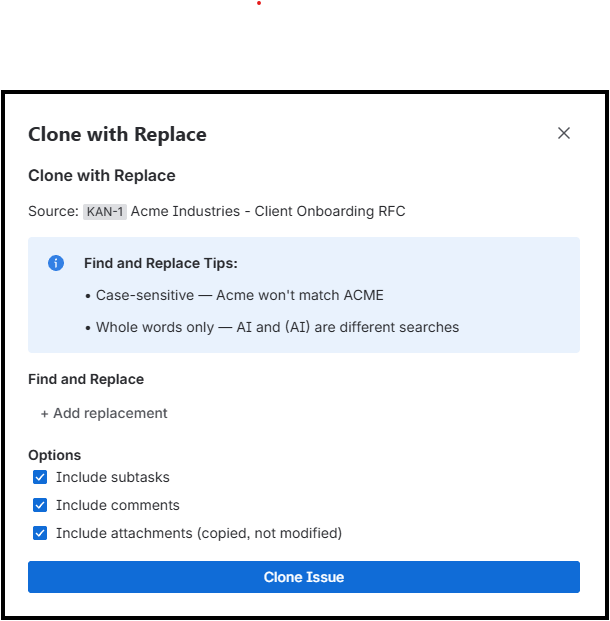
Choose your options — subtasks, comments, and attachments
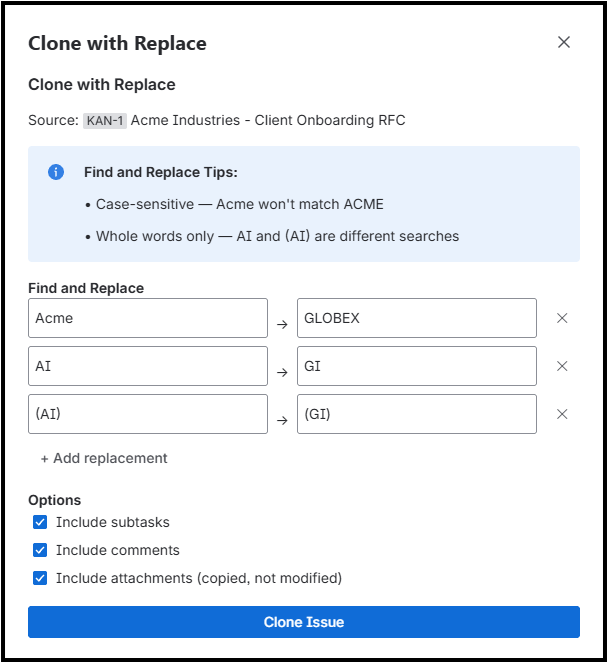
Add multiple find & replace pairs — case-sensitive, whole-word matching
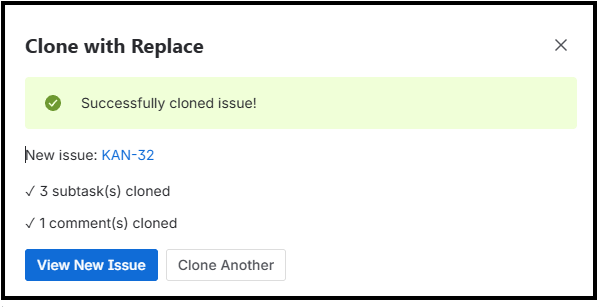
New issue created with all text replaced — subtasks and comments included
Cloning issues in Jira is tedious when you need to update text across multiple fields.
You clone an issue template, then spend the next 10 minutes manually replacing "Acme Industries" with your new client name — in the summary, description, comments, and subtasks.
Every. Single. Time.
Clone & Replace does it all in one click. Clone the issue and replace text across every field automatically.
Everything you need to clone smarter
Clone parent issues with all their subtasks intact. Maintain your issue hierarchy.
Replace text across summary, description, comments, and custom fields in one action.
Optionally copy attachments to the cloned issue. Keep your documentation intact.
Preserve important context by cloning comments along with the issue.
Match exact case or ignore case. Whole word matching prevents partial replacements.
Built on Forge — runs 100% on Atlassian infrastructure. Your data stays secure.
Clone and replace in seconds
Navigate to the issue you want to clone
Find the action in the issue menu
Specify what text to find and replace
Your new issue is created with all text replaced
Affordable for teams of all sizes
Free for up to 10 users
Install Clone & Replace from the Atlassian Marketplace and transform your Jira workflow today.